AI批量文献阅读:毕导飞书版本
基于毕导共享的飞书AI文献阅读模板,提供从Zotero批量导出文献、自动下载PDF并上传至飞书表格的完整工作流解决方案。
📚 AI批量文献阅读:毕导飞书版本 | AI Batch Paper Reading



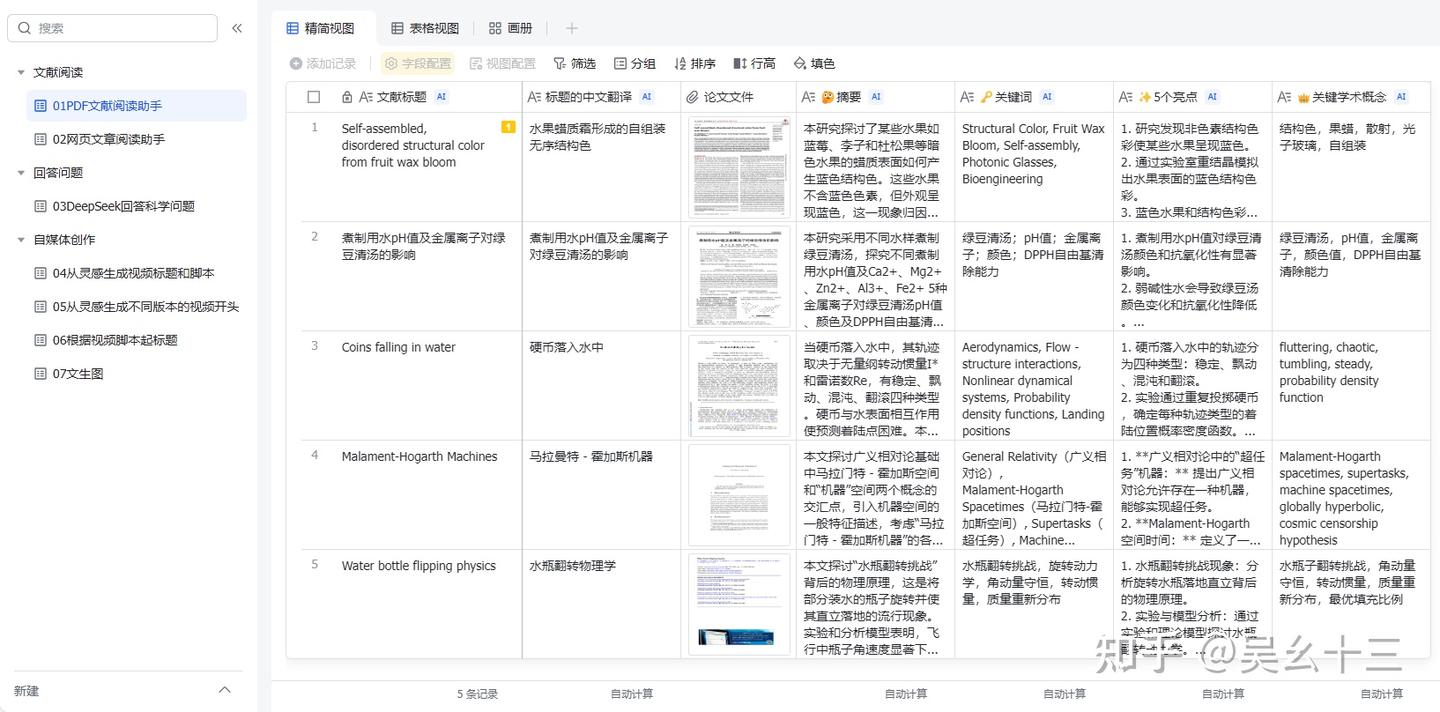
✨ 前不久毕导共享了一个飞书多维表格模板,结合AI能力实现文献的自动化阅读与信息提取,比传统独立网站的AI文献阅读效率更高,且具备Excel表格的灵活管理优势。该飞书表格的具体介绍内容可以看毕导公众号发的内容:https://mp.weixin.qq.com/s/YDjeLcD4RriuIyb9QzCbZQ
🎯 核心优势
相比于Zotero,其表格性质还是使该方法有其特别的优势,仅需通过飞书表格插件批量上传pdf后,其就可以自动计算各列已经设置好的内容并输出。
🤔 问题背景
问题在于,现在大家都在用别的文献管理软件,比如Zotero,如何把文献批量地导出并放进飞书表格中? 以下只针对Zotero进行步骤展示,其余文献管理软件步骤类似。
📝 实施步骤
🚀 步骤1:导出BibTex
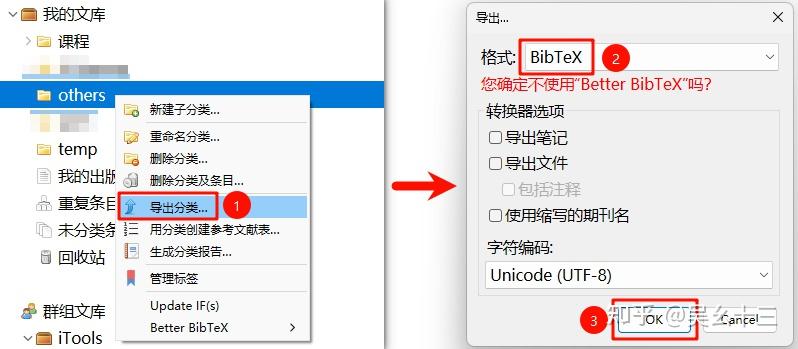
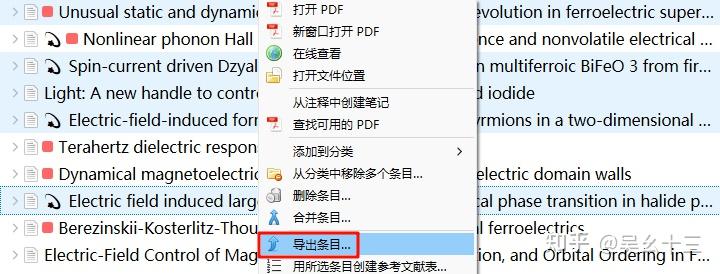
批量获取文献的BibTex并保存为文件。可以直接如下图选中文件夹导出BibTex,也可以选中某文件夹中(需要导出)的部分文献条目然后右键导出。(别的文献管理软件我不熟) 反正只需要获得一个BibTex文件即可,很多文献网站也是可以直接获得这个文件的。
| 💡 Zotero用户必看: 建议在导出前,对所有文献进行下述操作:批量选中文献后右键→Manage DOIs→Get long DOIs。通过该操作获得准确且不为空的DOI,btw,Manage DOIs是Zotero的一个插件,具体安装过程请移步我的另一篇文章:[整合 | Zotero文献管理工具配置手册(治愈强迫症)](https://zhuanlan.zhihu.com/p/371968761) |

🔍 步骤2:提取DOI与标题
假设步骤1中保存的BibTex文件名为 test.bib,则请运行下述代码文件 grep_doi_title.py,(将test.bib和grep_doi_title.py放在同一文件夹/目录中)命令行形式如下:
1
python grep_doi_title.py test.bib
运行完成后会获得一个名为 output_title_doi.txt 的文件,其内容为:第一列是doi,第二列是文章标题,每一行为一篇文献信息。
⚠️ 注意: 目前该代码不能保证DOI、标题中存在乱码或中文时顺利运行,如需改进,可以咨询世界上最好的DeepSeek。🤖
1
2
3
4
5
6
7
8
9
10
11
12
13
14
15
16
17
18
19
20
21
22
23
24
25
26
27
28
29
30
31
32
33
34
35
36
37
38
39
40
41
42
43
44
45
import re
import sys

def extract_title_and_doi(bib_file_path, output_file_path):
    try:
        with open(bib_file_path, 'r', encoding='utf-8') as file:
            content = file.read()

        # 使用正则表达式提取标题和 DOI
        entries = re.split(r'@[\w]+\{', content)[1:]  # 分割出条目
        results = []

        for entry in entries:
            # 提取标题
            title_match = re.search(r'title\s*=\s*{([^{}]+)}', entry, re.IGNORECASE)
            title = title_match.group(1).strip() if title_match else "No Title Found"

            # 提取 DOI
            doi_match = re.search(r'(doi|DOI|Doi)\s*=\s*{\s*(.*?)\s*}', entry, re.IGNORECASE)
            doi = doi_match.group(2).strip() if doi_match else "No DOI Found"

            results.append((title, doi))

        # 写入结果到输出文件
        with open(output_file_path, 'w', encoding='utf-8') as out_file:
            for title, doi in results:
                #out_file.write(f"{title} DOI: {doi}\n")
                out_file.write(f"{doi} {title}\n")

        print(f"成功提取 {len(results)} 个条目的标题和 DOI,并已保存到 {output_file_path}")

    except FileNotFoundError:
        print(f"错误: 找不到文件 '{bib_file_path}'。")
    except Exception as e:
        print(f"处理文件时发生错误: {e}")

if __name__ == "__main__":
    if len(sys.argv) != 2:
        print("用法: python test.py <input_bib_file>")
        sys.exit(1)

    input_bib_file = sys.argv[1]
    output_file = "output_title_doi.txt"  # 默认输出文件名,可自行修改

    extract_title_and_doi(input_bib_file, output_file)
⬇️ 步骤3:批量下载PDF
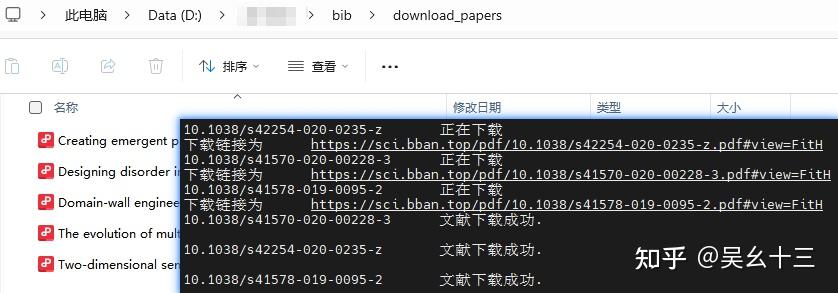
假设步骤2中获得的输出文件名为 output_title_doi.txt,则请运行下述代码文件 download_pdf.py,(将output_title_doi.txt和download_pdf.py放在同一文件夹/目录中)命令行形式如下:
1
python download_pdf.py
等待一段时间后,即可检查文件下载情况。下载的具体情况被记录在下述日志文件中:
- 📄
download_log.txt- 下载成功/失败的详细日志 - 📄
failed_dois.txt- 下载失败的DOI列表
1
2
3
4
5
6
7
8
9
10
11
12
13
14
15
16
17
18
19
20
21
22
23
24
25
26
27
28
29
30
31
32
33
34
35
36
37
38
39
40
41
42
43
44
45
46
47
48
49
50
51
52
53
54
55
56
57
58
59
60
61
62
63
64
65
66
67
68
69
70
71
72
73
74
75
76
77
78
79
80
81
82
83
84
85
86
87
88
89
90
91
92
93
94
95
96
97
98
99
100
101
102
103
104
105
106
107
108
109
110
111
112
113
114
115
116
117
118
119
120
121
122
123
124
125
126
127
128
129
130
131
132
133
134
135
136
137
138
139
140
141
142
143
144
145
146
147
import requests
from bs4 import BeautifulSoup
import os
import threading
import pandas as pd
import re
from queue import Queue

# 清理文件名中的非法字符
def clean_filename(title):
    illegal_chars = r'[\\/:*?"<>|]'
    return re.sub(illegal_chars, '', title)

# 下载文献的函数
def download_paper(doi_title_queue, success_log, error_log, failed_dois, sci_hub_domains, head, download_folder):
    while not doi_title_queue.empty():
        doi, title = doi_title_queue.get()  # 从队列中获取 DOI 和标题

        if not doi:  # 如果 DOI 为空
            error_log.append(f"{title}\t没有 DOI。\n")  # 记录没有 DOI 的文献
            failed_dois.append((title, 'No DOI'))  # 将没有 DOI 的文献标题和说明记录到 failed_dois 中
            doi_title_queue.task_done()  # 任务完成
            continue  # 跳过这篇文献

        download_url = None
        for domain in sci_hub_domains:
            url = domain + doi + "#"
            try:
                r = requests.get(url, headers=head, timeout=15)
                r.raise_for_status()
                soup = BeautifulSoup(r.text, "html.parser")

                if soup.iframe is None and soup.embed:
                    download_url = "https:" + soup.embed.attrs.get("src", "")
                elif soup.iframe:
                    download_url = soup.iframe.attrs.get("src", "")

                if download_url:
                    print(f"{doi}\t正在下载\n下载链接为\t" + download_url)
                    download_r = requests.get(download_url, headers=head, timeout=15)
                    download_r.raise_for_status()

                    file_name = clean_filename(title) + ".pdf"
                    file_path = os.path.join(download_folder, file_name)
                    with open(file_path, "wb+") as temp:
                        temp.write(download_r.content)

                    success_log.append(f"{doi}\t下载成功.\n")
                    print(f"{doi}\t文献下载成功.\n")
                    break

            except requests.exceptions.RequestException as e:
                error_log.append(f"{doi}\t下载失败! 错误信息: {str(e)}\n")
                continue

        if not download_url:
            error_log.append(f"{doi}\t下载失败! 无法从任何Sci-Hub域名获取文献.\n")
            failed_dois.append((title, doi))  # 将失败的文献标题和 DOI 记录到 failed_dois 中
        doi_title_queue.task_done()

def main():
    # 配置变量
    download_folder = './download_papers/' # 默认输出文件夹,可自行修改
    sci_hub_domains = [
        "https://www.sci-hub.ren/",
        "https://sci-hub.hk/",
        "https://sci-hub.se/",
        "https://sci-hub.st/",
        "https://sci-hub.la/",
        "https://sci-hub.cat/",
        "https://sci-hub.ee/",
        "https://www.tesble.com/"
    ]
    head = {
        "user-agent": "Mozilla/5.0 (Windows NT 10.0; Win64; x64) AppleWebKit/537.36 (KHTML, like Gecko) Chrome/79.0.3945.117 Safari/537.36"
    }
    num_threads = 5

    # 创建保存下载文件的文件夹
    if not os.path.exists(download_folder):
        os.makedirs(download_folder)

    # 读取文本文件并提取 DOI 和 Title
    doi_list = []
    titles = []
    with open("output_title_doi.txt", "r") as f:   # 默认输入文件,可自行修改
        for line in f:
            line = line.strip()  # 去除首尾空白字符
            if not line:
                continue

            # 按第一个空格分割:第一列为 DOI,剩余部分为 Title
            parts = line.split(" ", 1)  # 分割 1 次(保留标题中的空格)
            if len(parts) == 2:
                doi, title = parts
                doi_list.append(doi)
                titles.append(title)
            else:
                print(f"格式错误:忽略无法解析的行 -> {line}")

    # 创建一个线程安全的队列
    doi_title_queue = Queue()

    # 将 DOI 和标题一一对应地放入队列中
    for doi, title in zip(doi_list, titles):
        doi_title_queue.put((doi, title))

    # 成功与失败的记录
    success_log = []
    error_log = []
    failed_dois = []  # 使用列表来存储失败的 DOI 和文献标题

    # 启动多线程下载文献
    threads = []
    for _ in range(num_threads):
        t = threading.Thread(target=download_paper, args=(
        doi_title_queue, success_log, error_log, failed_dois, sci_hub_domains, head, download_folder))
        threads.append(t)

    # 启动所有线程
    for t in threads:
        t.start()

    # 等待所有线程完成
    for t in threads:
        t.join()

    # 记录成功和失败的日志
    with open(os.path.join("./download_log.txt"), "w", encoding="utf-8") as log_file:
        log_file.write("成功下载的DOI:\n")
        log_file.writelines(success_log)
        log_file.write("\n下载失败的DOI:\n")
        log_file.writelines(error_log)

    # 输出下载失败的文献(包括没有 DOI 的文献)
    with open(os.path.join("./failed_dois.txt"), "w", encoding="utf-8") as failed_file:
        failed_file.write("以下DOI下载失败,请手动检查资源:\n")
        for title, doi in failed_dois:
            if doi == 'No DOI':
                failed_file.write(f"{title}\t没有 DOI\n")  # 没有 DOI 的文献
            else:
                failed_file.write(f"{title}\t{doi}\n")  # 有 DOI 但下载失败的文献

    print("所有任务完成!")

if __name__ == '__main__':
    main()
📤 步骤4:上传至飞书
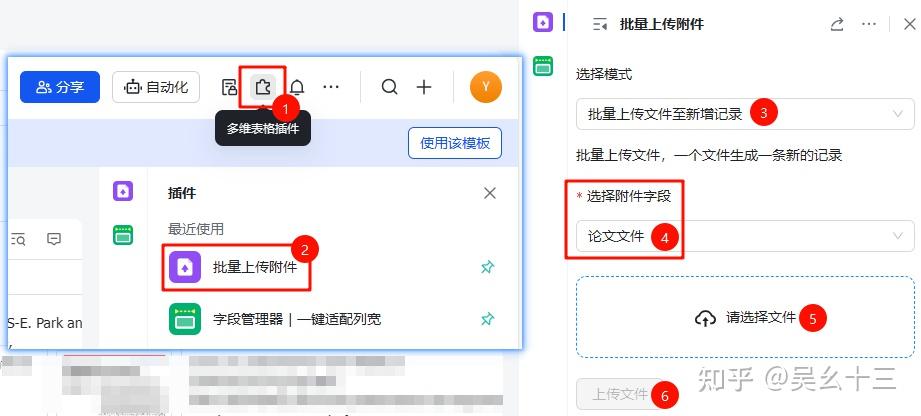
打开飞书模板,批量将步骤3中下载好的PDF上传到”论文文件”这一列。上传完成后即可坐享其成。🎉
🤔 步骤5:添加进度列
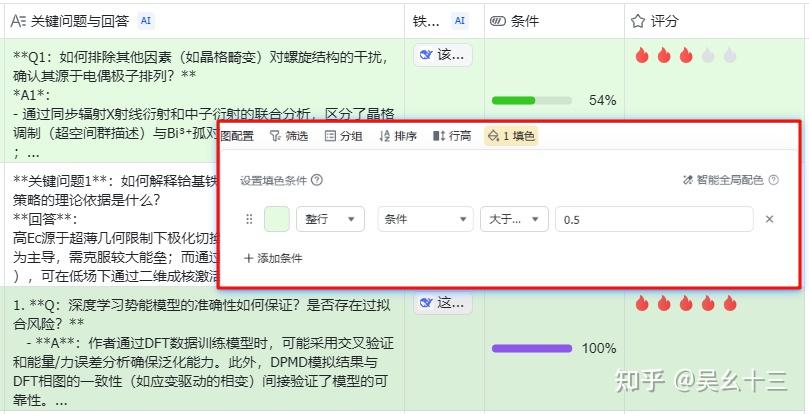
熟悉使用该表格后,可根据自己需求添加不同功能的列,比如DeepSeek的各种分析、个人对文章的评分、阅读理解的进度。当有了进度这一列之后,根据自己的阅读理解程度,拖动进度条,然后设置表格自动填色(设置填色条件),如果进度条大于50%,填色,代表这篇文章大概是读过了理解了。
📋 文件结构
1
2
3
4
5
6
7
8
📁 your_project/
├── 📄 test.bib                    # 步骤1:Zotero导出的BibTex文件
├── 🐍 grep_doi_title.py           # 步骤2:提取DOI和标题的脚本
├── 📄 output_title_doi.txt        # 步骤2:生成的DOI-标题对照表
├── 🐍 download_pdf.py             # 步骤3:批量下载PDF的脚本
├── 📁 download_papers/            # 步骤3:下载的PDF文件存放目录
├── 📄 download_log.txt            # 步骤3:下载日志
└── 📄 failed_dois.txt             # 步骤3:下载失败的DOI列表
⚠️ 免责声明
本教程仅供学术交流使用,请遵守相关文献数据库的使用条款和版权法规。
此外,在使用python爬取文献时,请确保遵守相关网站的robots.txt规则,避免对网站造成过大负担。
目前,有些文献数据库可能会对批量爬取行为进行限制,建议在合理范围内操作。
至少,PRL在使用上述方法后不久,就增加了人类识别验证码,导致无法批量下载文献。